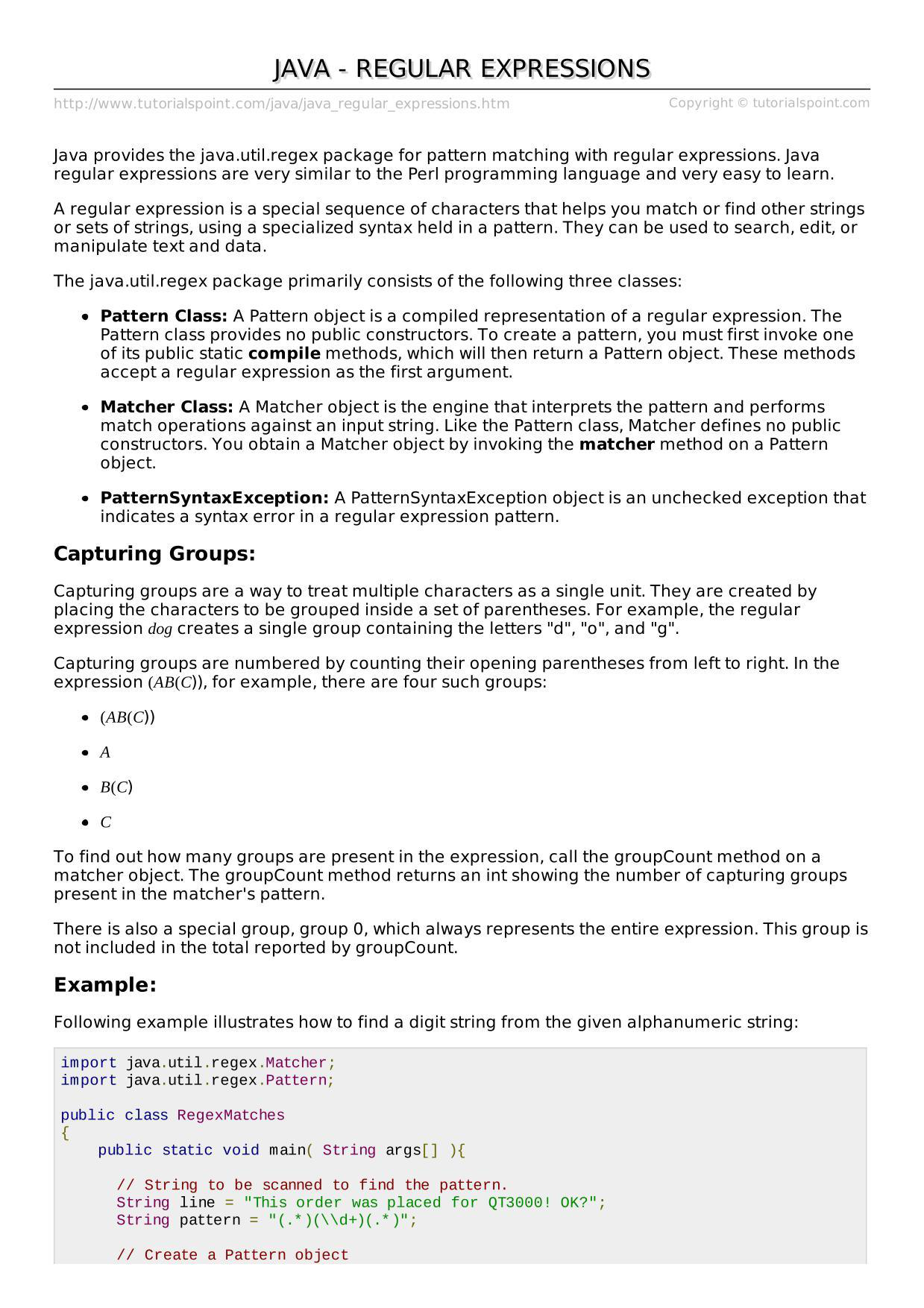
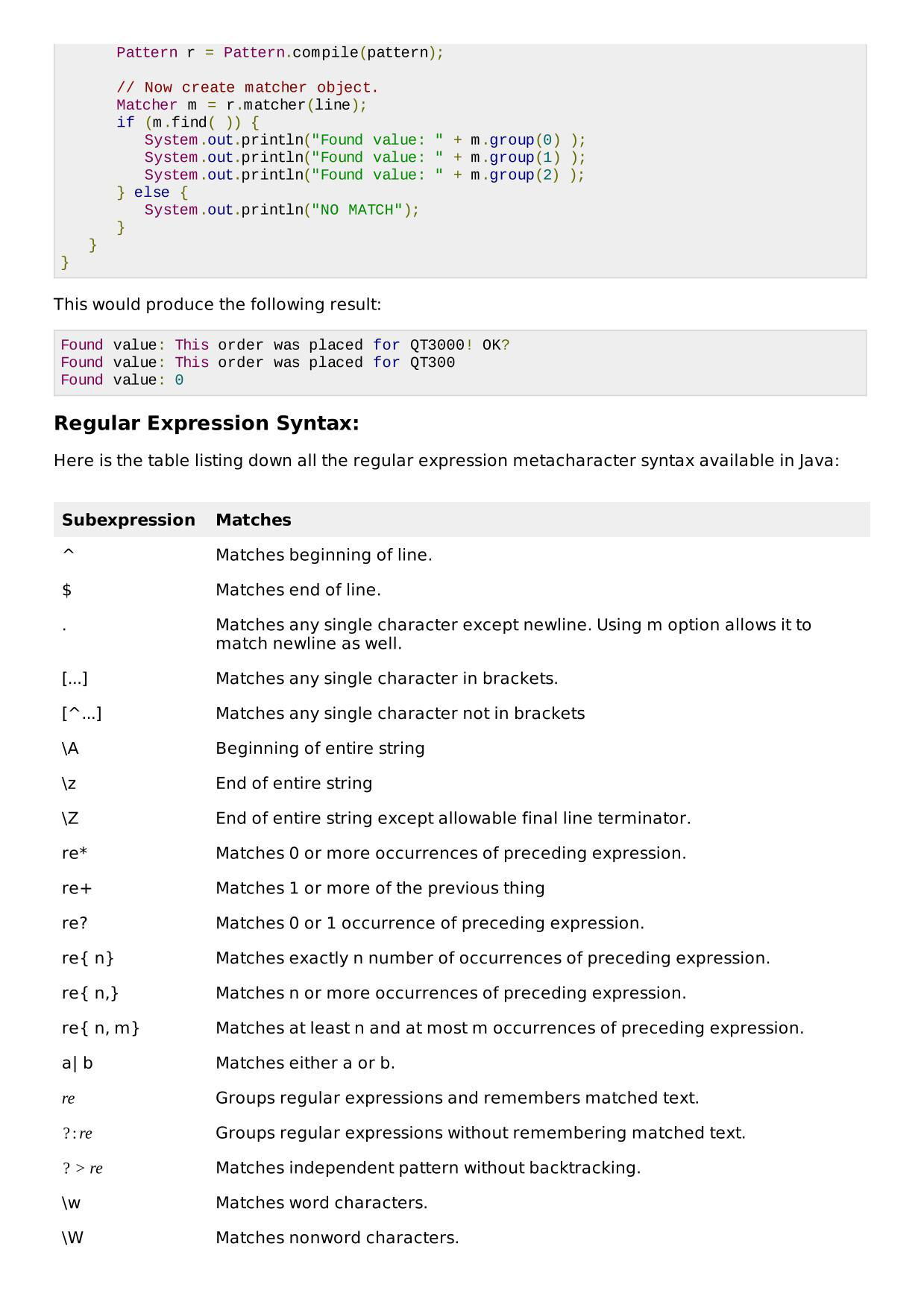
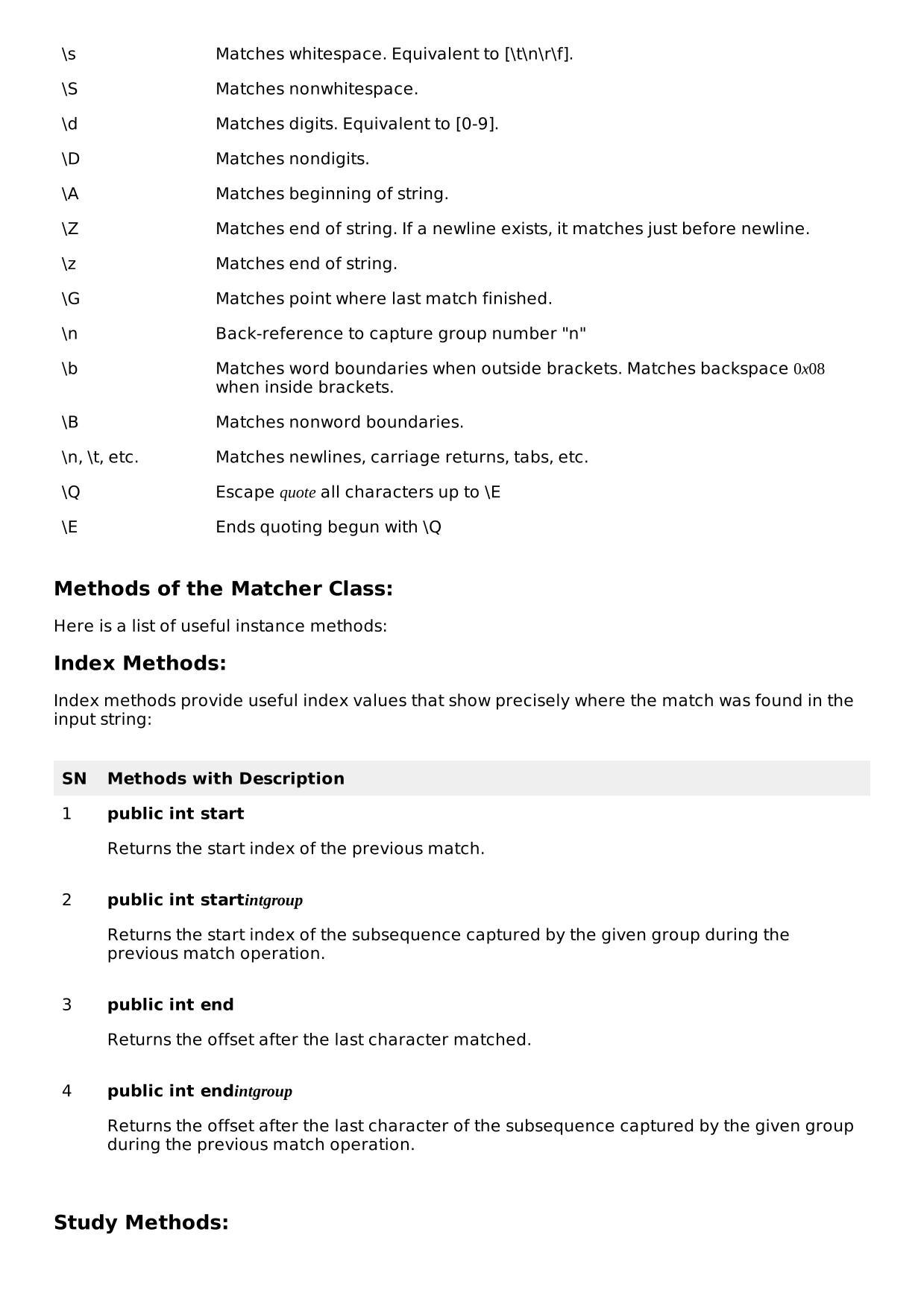
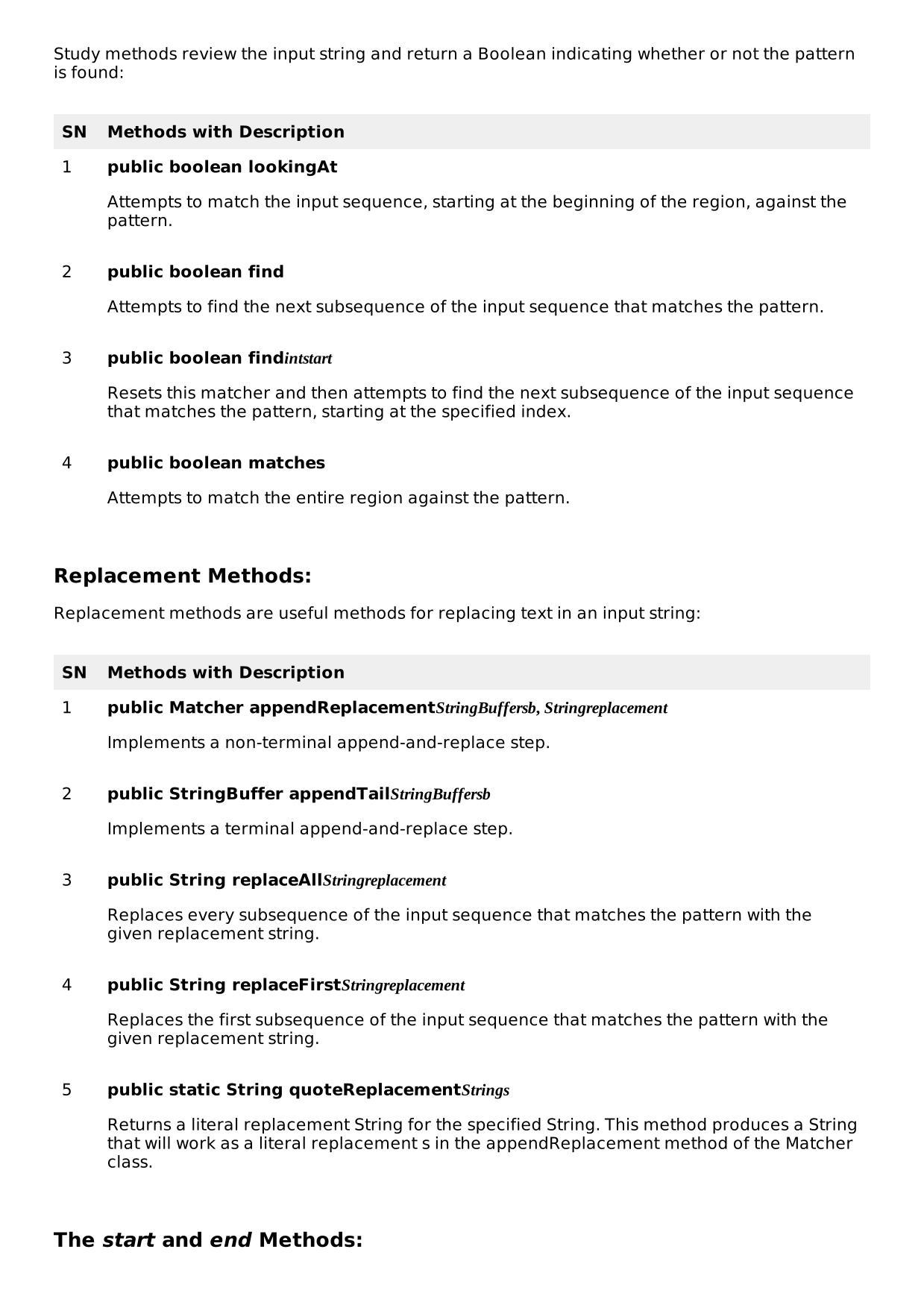
Programmieren Schülerscript V1.3:
BASICS
1.Variables & Data Types
int age = 25;
double price = 19.99;
char letter = 'A';
boolean isActive = true;
String name = "Anna";
2. Basic Input (Scanner)
import java.util.Scanner;
Scanner sc = new Scanner(System.in);
System.out.print("Enter your name: ");
String name = sc.nextLine();
System.out.println("Hello " + name);
3. Basic Output
System.out.println("Hello World"); //With New Line
System.out.print("No newline");    //Without New Line
4. Arithmetic Operations
int a = 10;
int b = 3;
int sum = a + b; // Addition: 10 + 3 = 13
int diff = a - b; // Subtraktion: 10 - 3 = 7
int prod = a * b; // Multiplikation: 10 * 3 = 30
int div = a / b; // Ganzzahl-Division: 10 / 3 = 3
int mod = a % b; // Modulo: 10 % 3 = 1
a++; // Post-Inkrement: a = a + 1 -> a = 11
b--; // Post-Dekrement: b = b - 1 -> b = 2
++a; // Prä-Inkrement: a = a + 1 -> a = 12
--b; // Prä-Dekrement: b = b - 1 -> b = 1
int sumAssign = 5;
sumAssign += 3; // Addition mit Zuweisung: sumAssign = 5 + 3 -> 8
int diffAssign = 5;
diffAssign -= 2; // Subtraktion mit Zuweisung: diffAssign = 5 - 2 -> 3
int prodAssign = 5;
prodAssign *= 4; // Multiplikation mit Zuweisung: prodAssign = 5 * 4 -> 20
int divAssign = 20;
divAssign /= 5; // Division mit Zuweisung: divAssign = 20 / 5 -> 4
int modAssign = 10;
modAssign %= 3; // Modulo mit Zuweisung: modAssign = 10 % 3 -> 1
5. If / Else
int age = 18;
if (age >= 18) {
System.out.println("Adult");
} else {
System.out.println("Minor");
}
6. Switch Case
int day = 3;
switch (day) {
case 1 -> System.out.println("Monday");
case 2 -> System.out.println("Tuesday");
case 3 -> System.out.println("Wednesday");
default -> System.out.println("Unknown");
}
7. Loops (For /While)
for (int i = 0; i < 5; i++) {
System.out.println("i = " + i);
}
String text = "Hello World 123";
String[] words = text.split(" ");
System.out.println("Split:");
for(String word : words) {
System.out.println(word);
// Hello
// World
// 123
}
int i = 0;
while (i < 5) {
System.out.println(i);
i++;
}
8. Arrays
int[] numbers = {1, 2, 3, 4};
for (int n : numbers) {
System.out.println(n);
}
9. Methods
public static int add(int a, int b) {
return a + b;
}
public static void main(String[] args) {
System.out.println(add(3, 5));
}
10. Classes & Objects & Main
class Person {
String name;
Person(String name) {
this.name = name;
}
void greet() {
System.out.println("Hello, I'm " + name);
}
}
public class Main {
public static void main(String[] args) {
Person p = new Person("Anna");
p.greet();
}
}
KLASSEN
1. Einfache Klasse – Person
public class Person {
private String name;
private int age;
// Konstruktor
public Person(String name, int age) {
this.name = name;
this.age = age;
}
// Getter & Setter
public String getName() {
return name;
}
public void setName(String name) {
this.name = name;
}
public int getAge() {
return age;
}
public void setAge(int age) {
this.age = age;
}
// Methode
public void introduce() {
System.out.println("Hallo, ich bin " + name + " und " + age + " Jahre
alt.");
}
}
2. Abstrakte Klasse – Animal
public abstract class Animal {
private String name;
public Animal(String name) {
this.name = name;
}
public String getName() {
return name;
}
// Abstrakte Methode: muss in Unterklassen implementiert werden
public abstract void makeSound();
}
3. Vererbung – Dog
public class Dog extends Animal {
public Dog(String name) {
super(name);
}
@Override
public void makeSound() {
System.out.println(getName() + " sagt: Wuff!");
}
}
4. Interface – Movable
public interface Movable {
void move();
}
5. Klasse, die ein Interface implementiert – Car
public class Car implements Movable {
private String model;
public Car(String model) {
this.model = model;
}
@Override
public void move() {
System.out.println(model + " fährt los!");
}
}
6. Main-Klasse zum Testen
public class Main {
//Globale Variabeln HIER
public static void main(String[] args) {
Person p = new Person("Anna", 28); //Alles was Objekt ist benötigt new
OBJEKT
p.introduce();
Animal dog = new Dog("Bello");
dog.makeSound();
Movable car = new Car("Audi A4");
car.move();
}
}
GUI – JavaX.swing
Komplettes Beispiel mit allen Layouts + Eventhandling
import javax.swing.*;
import javax.swing.event.ChangeEvent;
import javax.swing.event.ChangeListener;
import java.awt.*;
import java.awt.event.*;
/**
* Umfangreiches Beispiel einer Java Swing GUI, das zeigt:
* - verschiedene Layouts (BorderLayout, FlowLayout, GridLayout, BoxLayout, GridBagLayout)
* - Labels mit Schriftarten und fett
* - Verwendung von JPanel
* - Instanzvariablen für Komponenten
* - verschiedene Button-Typen (JButton, JToggleButton, JCheckBox, JRadioButton)
* - Menü mit JMenuItem
* - DefaultCloseOperation, setSize, setResizable
* - Event-Handling (ActionListener, ItemListener, ChangeListener, WindowListener)
*/
public class JavaSwingGUIExample extends JFrame {
// --- Instanzvariablen (Sichtbar über die ganze Klasse) ---
private JPanel topPanel;            // BorderLayout.NORTH
private JPanel centerPanel;         // BorderLayout.CENTER
private JPanel bottomPanel;         // BorderLayout.SOUTH
private JLabel statusLabel;         // zeigt Statusmeldungen
// Buttons
private JButton normalButton;
private JButton iconButton;
private JToggleButton toggleButton;
private JCheckBox checkBox;
private JRadioButton radio1, radio2, radio3;
// Menü
private JMenuItem exitMenuItem;
public JavaSwingGUIExample() {
super("Java Swing GUI Beispiel");
// Grundkonfiguration des Frames
setDefaultCloseOperation(JFrame.EXIT_ON_CLOSE); //
DefaultCloseOperation
setSize(900, 600);                              // setSize
setResizable(true);                             // setResizable
setLocationRelativeTo(null);                    // zentrieren
// Menü erstellen
createMenuBar();
// Komponenten und Layouts aufbauen
buildTopPanel();
buildCenterPanel();
buildBottomPanel();
// Haupt-Layout des Frames
Container cp = getContentPane();
cp.setLayout(new BorderLayout(8, 8));
cp.add(topPanel, BorderLayout.NORTH);
cp.add(centerPanel, BorderLayout.CENTER);
cp.add(bottomPanel, BorderLayout.SOUTH);
// WindowListener (Event handling auf Fenster-Ebene)
addWindowListener(new WindowAdapter() {
@Override
public void windowClosing(WindowEvent e) {
System.out.println("Fenster wird geschlossen");
}
@Override
public void windowOpened(WindowEvent e) {
statusLabel.setText("Anwendung gestartet");
}
});
}
private void createMenuBar() {
JMenuBar menuBar = new JMenuBar();
JMenu fileMenu = new JMenu("Datei");
exitMenuItem = new JMenuItem("Beenden");
exitMenuItem.addActionListener(e -> System.exit(0));
fileMenu.add(exitMenuItem);
menuBar.add(fileMenu);
setJMenuBar(menuBar);
}
private void buildTopPanel() {
topPanel = new JPanel(new FlowLayout(FlowLayout.LEFT)); // FlowLayout
// Label mit verschiedener Schriftart und fett
JLabel titleLabel = new JLabel("Java Swing GUI - Demo");
titleLabel.setFont(new Font("Serif", Font.BOLD, 24)); // fett
JLabel subtitle = new JLabel("(verschiedene Layouts, Buttons &
Events)");
subtitle.setFont(new Font("SansSerif", Font.ITALIC, 12));
topPanel.add(titleLabel);
topPanel.add(Box.createHorizontalStrut(10));
topPanel.add(subtitle);
}
private void buildCenterPanel() {
centerPanel = new JPanel();
centerPanel.setLayout(new GridLayout(1, 2, 8, 8)); // GridLayout
// Linke Seite: verschiedene Buttons in einem Grid
JPanel buttonPanel = new JPanel();
buttonPanel.setBorder(BorderFactory.createTitledBorder("Buttons"));
buttonPanel.setLayout(new GridLayout(6, 1, 4, 4));
// normaler JButton mit ActionListener
normalButton = new JButton("Normaler Button");
normalButton.addActionListener(e -> onNormalButton());
// JButton mit Icon (wenn Icon nicht gefunden, geht es trotzdem)
Icon infoIcon = UIManager.getIcon("OptionPane.informationIcon");
iconButton = new JButton("Icon Button", infoIcon);
iconButton.setToolTipText("Button mit Icon");
iconButton.addActionListener(e -> statusLabel.setText("Icon-Button
gedrückt"));
// JToggleButton
toggleButton = new JToggleButton("Toggle");
toggleButton.addItemListener(e -> {
if (e.getStateChange() == ItemEvent.SELECTED)
statusLabel.setText("Toggle: AN");
else
statusLabel.setText("Toggle: AUS");
});
// JCheckBox
checkBox = new JCheckBox("Resizability aktivieren");
checkBox.setSelected(true);
checkBox.addItemListener(e -> setResizable(checkBox.isSelected()));
// JRadioButtons in einer ButtonGroup
JPanel radios = new JPanel(new FlowLayout(FlowLayout.LEFT));
radios.setBorder(BorderFactory.createTitledBorder("Radio-Gruppe"));
radio1 = new JRadioButton("Option 1");
radio2 = new JRadioButton("Option 2");
radio3 = new JRadioButton("Option 3");
ButtonGroup bg = new ButtonGroup();
bg.add(radio1); bg.add(radio2); bg.add(radio3);
radio1.addItemListener(e -> { if
(e.getStateChange()==ItemEvent.SELECTED) statusLabel.setText("Option 1
gewählt"); });
radio2.addItemListener(e -> { if
(e.getStateChange()==ItemEvent.SELECTED) statusLabel.setText("Option 2
gewählt"); });
radio3.addItemListener(e -> { if
(e.getStateChange()==ItemEvent.SELECTED) statusLabel.setText("Option 3
gewählt"); });
radios.add(radio1); radios.add(radio2); radios.add(radio3);
// JButton mit AbstractAction (zeigt nochmal eine andere Art, Events
zu verarbeiten)
Action specialAction = new AbstractAction("Special Action") {
@Override
public void actionPerformed(ActionEvent e) {
statusLabel.setText("Special Action ausgeführt");
}
};
JButton actionButton = new JButton(specialAction);
// ChangeListener Beispiel (für Slider -> hier als Demo ein JSlider)
JSlider slider = new JSlider(0, 100, 50);
slider.addChangeListener(new ChangeListener() {
@Override
public void stateChanged(ChangeEvent e) {
statusLabel.setText("Slider: " + slider.getValue());
}
});
// Komponenten in buttonPanel
buttonPanel.add(normalButton);
buttonPanel.add(iconButton);
buttonPanel.add(toggleButton);
buttonPanel.add(checkBox);
buttonPanel.add(actionButton);
buttonPanel.add(slider);
// Rechte Seite: Demonstration verschiedener Layouts in JPanels
JPanel layoutDemo = new JPanel();
layoutDemo.setBorder(BorderFactory.createTitledBorder("Layout-
Demos"));
layoutDemo.setLayout(new BoxLayout(layoutDemo, BoxLayout.Y_AXIS)); //
BoxLayout
// FlowLayout Beispiel
JPanel flow = new JPanel(new FlowLayout(FlowLayout.LEFT));
flow.setBorder(BorderFactory.createTitledBorder("FlowLayout"));
flow.add(new JLabel("A")); flow.add(new JLabel("B")); flow.add(new
JLabel("C"));
// GridLayout Beispiel
JPanel grid = new JPanel(new GridLayout(2, 2, 4, 4));
grid.setBorder(BorderFactory.createTitledBorder("GridLayout 2x2"));
grid.add(new JLabel("1")); grid.add(new JLabel("2")); grid.add(new
JLabel("3")); grid.add(new JLabel("4"));
// GridBagLayout Beispiel (flexibel)
JPanel gb = new JPanel(new GridBagLayout());
gb.setBorder(BorderFactory.createTitledBorder("GridBagLayout"));
GridBagConstraints c = new GridBagConstraints();
c.insets = new Insets(2,2,2,2);
c.gridx = 0; c.gridy = 0; gb.add(new JLabel("GBA-Label 1:"), c);
c.gridx = 1; c.gridy = 0; c.weightx = 1.0; c.fill =
GridBagConstraints.HORIZONTAL; gb.add(new JTextField("TextField"), c);
layoutDemo.add(flow);
layoutDemo.add(grid);
layoutDemo.add(gb);
centerPanel.add(buttonPanel);
centerPanel.add(layoutDemo);
}
private void buildBottomPanel() {
bottomPanel = new JPanel(new BorderLayout());
statusLabel = new JLabel("Bereit");
statusLabel.setFont(new Font("Dialog", Font.BOLD, 14)); // fett
bottomPanel.add(statusLabel, BorderLayout.WEST);
// Beispiel für einen kleinen Input-Bereich
JPanel inputPanel = new JPanel(new FlowLayout(FlowLayout.RIGHT));
JTextField input = new JTextField(20);
JButton send = new JButton("Senden");
send.addActionListener(e -> statusLabel.setText("Gesendet: " +
input.getText()));// Dies nicht benutzen
inputPanel.add(input);
inputPanel.add(send);
bottomPanel.add(inputPanel, BorderLayout.EAST);
}
private void onNormalButton() {
// Beispiel: Modal-Dialog anzeigen
JOptionPane.showMessageDialog(this, "Der normale Button wurde
gedrückt", "Info", JOptionPane.INFORMATION_MESSAGE);
statusLabel.setText("Normaler Button gedrückt");
}
public static void main(String[] args) {
// GUI muss im EDT (Event Dispatch Thread) gestartet werden
SwingUtilities.invokeLater(() -> {
JavaSwingGUIExample frame = new JavaSwingGUIExample();
frame.setVisible(true);
});
}
}
2.JPanel – JLabel-JTextField
import javax.swing.*;
import java.awt.*;
public class PanelInputExample {
public static void main(String[] args) {
JFrame frame = new JFrame("Input mit JPanel");
frame.setDefaultCloseOperation(JFrame.EXIT_ON_CLOSE);
frame.setSize(350, 180);
frame.setLayout(new GridLayout(3, 1, 10, 10)); // 3 Zeilen, 1 Spalte,
Abstand 10px
// Panel für Benutzername
JPanel userPanel = new JPanel(new BorderLayout(5, 5)); // Label links,
Feld rechts
JLabel userLabel = new JLabel("Benutzername:");
userLabel.setFont(new Font("Arial", Font.BOLD, 16));
JTextField userField = new JTextField(20); // Feldlänge 20 Zeichen
userPanel.add(userLabel, BorderLayout.WEST);
userPanel.add(userField, BorderLayout.CENTER);
// Panel für Passwort
JPanel passPanel = new JPanel(new BorderLayout(5, 5));
JLabel passLabel = new JLabel("Passwort:");
passLabel.setFont(new Font("Courier New", Font.ITALIC, 14));
JTextField passField = new JTextField(20); // Feldlänge 20 Zeichen
passPanel.add(passLabel, BorderLayout.WEST);
passPanel.add(passField, BorderLayout.CENTER);
// Panel für Button
JPanel buttonPanel = new JPanel();
JButton submitButton = new JButton("Absenden");
submitButton.addActionListener(e -> {
JOptionPane.showMessageDialog(frame,
"Benutzername: " + userField.getText() + "\nPasswort: " +
passField.getText());
});
buttonPanel.add(submitButton);
// Panels zum Frame hinzufügen
frame.add(userPanel);
frame.add(passPanel);
frame.add(buttonPanel);
frame.setVisible(true);
}
}
3.JOptionPane
import javax.swing.*;
public class JOptionPaneDemo {
public static void main(String[] args) {
// 1) Einfache Nachricht
JOptionPane.showMessageDialog(
null,
"Dies ist eine einfache Nachricht.",
"MessageDialog",
JOptionPane.INFORMATION_MESSAGE
);
// 2) Warnung
JOptionPane.showMessageDialog(
null,
"Dies ist eine Warnung!",
"Warnung",
JOptionPane.WARNING_MESSAGE
);
// 3) Fehler
JOptionPane.showMessageDialog(
null,
"Es ist ein Fehler aufgetreten.",
"Fehler",
JOptionPane.ERROR_MESSAGE
);
// 4) Frage-Dialog
JOptionPane.showMessageDialog(
null,
"Eine Frage (nur zur Anzeige).",
"Frage",
JOptionPane.QUESTION_MESSAGE
);
// 5) Bestätigungsdialog (Ja/Nein)
int confirm = JOptionPane.showConfirmDialog(
null,
"Möchten Sie fortfahren?",
"Bestätigung",
JOptionPane.YES_NO_OPTION
);
System.out.println("Auswahl confirm: " + confirm);
// 6) Bestätigungsdialog (Ja/Nein/Abbrechen)
int confirm2 = JOptionPane.showConfirmDialog(
null,
"Ja / Nein / Abbrechen?",
"Bestätigung",
JOptionPane.YES_NO_CANCEL_OPTION
);
System.out.println("Auswahl confirm2: " + confirm2);
// 7) InputDialog – Freitext
String text = JOptionPane.showInputDialog(
null,
"Bitte geben Sie etwas ein:",
"Text-Eingabe",
JOptionPane.QUESTION_MESSAGE
);
System.out.println("Eingabe: " + text);
// 8) InputDialog – Dropdown Auswahl
Object[] farben = {"Rot", "Grün", "Blau"};
Object auswahl = JOptionPane.showInputDialog(
null,
"Wähle eine Farbe:",
"Dropdown-Eingabe",
JOptionPane.PLAIN_MESSAGE,
null,
farben,
"Rot"
);
System.out.println("Farbwahl: " + auswahl);
// 9) OptionDialog – völlig frei
Object[] buttons = {"Speichern", "Laden", "Abbrechen"};
int option = JOptionPane.showOptionDialog(
null,
"Was möchten Sie tun?",
"Optionen",
JOptionPane.DEFAULT_OPTION,
JOptionPane.QUESTION_MESSAGE,
null,
buttons,
buttons[0]
);
System.out.println("Ausgewählte Option: " + option);
// 10) Eigener Icon (optional – funktioniert nur, wenn Bild existiert)
// ImageIcon icon = new ImageIcon("pfad/zu/bild.png");
// JOptionPane.showMessageDialog(null, "Nachricht mit eigenem Icon",
"Custom Icon", JOptionPane.PLAIN_MESSAGE, icon);
// 11) Nur Information ohne Titel
JOptionPane.showMessageDialog(null, "Kurze Info ohne Titel");
// 12) Nur OptionDialog ohne Icon / pure Buttons
String[] options2 = {"Option A", "Option B", "Option C"};
int click = JOptionPane.showOptionDialog(
null,
"Wähle eine Option:",
"Benutzerdefinierte Buttons",
JOptionPane.YES_NO_CANCEL_OPTION,
JOptionPane.PLAIN_MESSAGE,
null, // Icon null
options2,
options2[1]
);
System.out.println("Benutzerdefinierte Auswahl: " + click);
// 13) Dialog mit Textfeld + Buttons
JTextField feld = new JTextField();
Object[] content = {
"Geben Sie Ihren Namen ein:",
feld
};
int ok = JOptionPane.showConfirmDialog(
null,
content,
"Formular",
JOptionPane.OK_CANCEL_OPTION
);
if (ok == JOptionPane.OK_OPTION) {
System.out.println("Eingegeben: " + feld.getText());
}
}
}
4.JOptionPane-Beispiel mit Ausgabe
import javax.swing.JOptionPane;
public class JOptionPaneDemo {
public static void main(String[] args) {
// --- MESSAGE DIALOG ---
// Displays a simple message box
JOptionPane.showMessageDialog(
null,
"<html> <div style='color: red; background: blue'>OptionPane
Demo</div> </html>",
"Message Dialog",
JOptionPane.INFORMATION_MESSAGE
);
// --- INPUT DIALOG ---
// Asks the user to input their name
String name = JOptionPane.showInputDialog(
null,
"Name?",
"Input Dialog",
JOptionPane.QUESTION_MESSAGE
);
// If user cancels or closes the dialog, name will be null
if (name == null || name.isEmpty()) {
name = "Fremder";
}
// --- CONFIRM DIALOG ---
// Asks the user a Yes/No/Cancel type question.
int confirm = JOptionPane.showConfirmDialog(
null,
"Weiter, " + name + "?",
"Confirm Dialog",
JOptionPane.YES_NO_CANCEL_OPTION,
JOptionPane.QUESTION_MESSAGE
);
// Handle the user’s response
if (confirm == JOptionPane.YES_OPTION) {
JOptionPane.showMessageDialog(
null,
"Weiter geht's!",
"Response",
JOptionPane.INFORMATION_MESSAGE
);
} else if (confirm == JOptionPane.NO_OPTION) {
JOptionPane.showMessageDialog(
null,
"Bye.",
"Response",
JOptionPane.WARNING_MESSAGE
);
} else {
JOptionPane.showMessageDialog(
null,
"Abbruch!",
"Response",
JOptionPane.PLAIN_MESSAGE
);
}
// --- OPTION DIALOG ---
// Custom option dialog
Object[] options = {"Speichern", "Nicht speichern", "Abbrechen"};
int choice = JOptionPane.showOptionDialog(
null,
"Fortschritt speichern?",
"Option Dialog",
JOptionPane.YES_NO_CANCEL_OPTION,
JOptionPane.QUESTION_MESSAGE,
null,      // no custom icon
options,   // custom button labels
options[0] // default selected option
);
// Interpret the result of the user's choice
switch (choice) {
case 0:
JOptionPane.showMessageDialog(null, "Fortschritt gespeichert!",
"Result", JOptionPane.INFORMATION_MESSAGE);
break;
case 1:
JOptionPane.showMessageDialog(null, "Fortschritt nicht gespeichert.",
"Result", JOptionPane.WARNING_MESSAGE);
break;
case 2:
default:
JOptionPane.showMessageDialog(null, "Aktion abgebrochen.", "Result",
JOptionPane.PLAIN_MESSAGE);
break;
}
// --- END ---
// Final message before exiting
JOptionPane.showMessageDialog(
null,
"Demo beendet, " + name + ".",
"Goodbye",
JOptionPane.INFORMATION_MESSAGE
);
}
}
FILE IO + Exeptionhandling
FILE IO mit exeptionhandling + eigene exeption
import java.io.BufferedReader;
import java.io.BufferedWriter;
import java.io.FileReader;
import java.io.FileWriter;
import java.io.IOException;
/**
* Beispielprogramm:
* - Datei lesen & schreiben (File I/O)
* - Exception Handling mit try-catch
* - Eigene Exception (DateiLeerException)
*/
public class FileIOBeispiel {
public static void main(String[] args) {
String inputFile = "eingabe.txt";
String outputFile = "ausgabe.txt";
try {
// Datei lesen (kann IOException oder DateiLeerException werfen)
String inhalt = leseDatei(inputFile);
System.out.println("Datei erfolgreich gelesen:\n" + inhalt);
// Datei schreiben
schreibeDatei(outputFile, inhalt.toUpperCase());
System.out.println("Datei erfolgreich geschrieben.");
} catch (DateiLeerException e) {
// Eigene Exception → spezielle Fehlermeldung
System.err.println("Eigener Fehler: " + e.getMessage());
} catch (IOException e) {
// IOExceptions werden hier abgefangen
System.err.println("I/O Fehler: " + e.getMessage());
}
}
/**
* Liest eine Datei Zeile für Zeile ein.
* Wirft zusätzlich eine eigene Exception, wenn die Datei leer ist.
*/
public static String leseDatei(String dateiname) throws IOException, DateiLeerException {
StringBuilder sb = new StringBuilder();
// Datei wird automatisch geschlossen (try-with-resources)
try (BufferedReader reader = new BufferedReader(new FileReader(dateiname))) {
String zeile;
while ((zeile = reader.readLine()) != null) {
sb.append(zeile).append(System.lineSeparator());
}
}
// Eigene Exception werfen, wenn Datei leer
if (sb.toString().trim().isEmpty()) {
throw new DateiLeerException("Die Datei '" + dateiname + "' ist leer.");
}
return sb.toString();
}
/**
* Schreibt Text in eine Datei.
*/
public static void schreibeDatei(String dateiname, String text) throws IOException {
try (BufferedWriter writer = new BufferedWriter(new FileWriter(dateiname))) {
writer.write(text);
}
}
}
/**
* Eigene Exception für den Fall, dass die Datei leer ist.
*
* Eigene Exceptions erben in der Regel von Exception (checked exception).
*/
class DateiLeerException extends Exception {
// Konstruktor übernimmt die Fehlermeldung
public DateiLeerException(String message) {
super(message);
}
}
EXEPTIONS
Exeptions nochmal aber alles
/**
* Dieses Beispiel zeigt den Umgang mit Exceptions:
* - mehrere catch-Blöcke
* - eigene Exception
* - try-catch-finally
* - bewusstes Auslösen von Exceptions (throw)
*/
public class ExceptionBeispiel {
public static void main(String[] args) {
try {
int ergebnis = teile(10, 0);  // wir provozieren eine Division durch 0
System.out.println("Ergebnis: " + ergebnis);
} catch (ArithmeticException e) {
// Abfangen einer Standard-Exception
System.err.println("Mathematischer Fehler: " + e.getMessage());
} catch (UngueltigeZahlException e) {
// Abfangen unserer eigenen Exception
System.err.println("Eigener Fehler: " + e.getMessage());
} finally {
// Wird IMMER ausgeführt, egal ob Fehler passiert oder nicht
System.out.println("Finally-Block wurde ausgeführt.");
}
}
/**
* Methode teilt zwei Zahlen.
* Wirft unsere eigene Exception, wenn der zweite Parameter negativ ist.
*/
public static int teile(int a, int b) throws UngueltigeZahlException {
// Eigene Exception, wenn b negativ ist
if (b < 0) {
throw new UngueltigeZahlException("Der Divisor darf nicht negativ sein!");
}
// Standard-Exception (Division durch 0) wird automatisch ausgelöst
return a / b;
}
}
/**
* Eigene Exception für ungültige Parameter.
* Erbt von Exception → checked exception.
*/
class UngueltigeZahlException extends Exception {
public UngueltigeZahlException(String message) {
super(message);
}
}
Alles über Strings Buch s. 197
1.Strings
public class StringExample {
public static void main(String[] args) {
String text = "Hello World";
// Länge
System.out.println("Länge: " + text.length()); // Länge: 11
// Groß-/Kleinschreibung
System.out.println("UpperCase: " + text.toUpperCase()); // UpperCase:
HELLO WORLD
System.out.println("LowerCase: " + text.toLowerCase()); // LowerCase:
hello world
// Zeichenzugriff
System.out.println("Zeichen an Index 1: " + text.charAt(1)); //
Zeichen an Index 1: e
// Vergleich
System.out.println("Vergleich mit 'Hello': " + text.equals("Hello"));
// Vergleich mit 'Hello': false
// Teilstring
System.out.println("Substring(0,5): " + text.substring(0,5)); //
Substring(0,5): Hello
// Ersetzen
System.out.println("Ersetze 'World' durch 'Java': " +
text.replace("World", "Java")); // Ersetze 'World' durch 'Java': Hello Java
// Trimmen
String text2 = "   Hallo   ";
System.out.println("Getrimmt: '" + text2.trim() + "'"); // Getrimmt:
'Hallo'
// Aufteilen
String[] words = text.split(" ");
for(String word : words) {
System.out.println("Word: " + word);
// Word: Hello
// Word: World
}
// Enthält prüfen
System.out.println("Enthält 'World'? " + text.contains("World")); //
Enthält 'World'? true
}
}
2. StringBuilder
public class StringBuilderExample {
public static void main(String[] args) {
StringBuilder sb = new StringBuilder("Hello");
// Anhängen
sb.append(" World");
System.out.println(sb); // Hello World
// Einfügen
sb.insert(6, "Java ");
System.out.println(sb); // Hello Java World
// Löschen
sb.delete(6, 11);
System.out.println(sb); // Hello World
// Zeichen ersetzen
sb.setCharAt(0, 'h');
System.out.println(sb); // hello World
// Umkehren
sb.reverse();
System.out.println("Reverse: " + sb); // Reverse: dlroW olleh
// Länge
System.out.println("Length: " + sb.length()); // Length: 11
}
}
3. StringBuffer
public class StringBufferExample {
public static void main(String[] args) {
StringBuffer sb = new StringBuffer("Hello");
sb.append(" World");
System.out.println(sb); // Hello World
sb.insert(6, "Java ");
System.out.println(sb); // Hello Java World
sb.replace(6, 10, "C++");
System.out.println(sb); // Hello C++ World
sb.delete(6, 9);
System.out.println(sb); // Hello + World
sb.reverse();
System.out.println("Reverse: " + sb); // Reverse: dlroW + olleH
}
}
4. CharSequence
public class CharSequenceExample {
public static void main(String[] args) {
CharSequence cs1 = "Hello"; // String
CharSequence cs2 = new StringBuilder("World"); // StringBuilder
System.out.println("Länge cs1: " + cs1.length()); // Länge cs1: 5
System.out.println("Zeichen an Index 1 cs2: " + cs2.charAt(1)); //
Zeichen an Index 1 cs2: o
// Subsequence
System.out.println("Subsequence cs1: " + cs1.subSequence(0, 4)); //
Subsequence cs1: Hell
System.out.println("Subsequence cs2: " + cs2.subSequence(1, 4)); //
Subsequence cs2: orl
}
}
5.StringTokenizer
import java.util.StringTokenizer;
public class TokenizerBeispiel {
public static void main(String[] args) {
String text = "Apfel,Birne,Banane,Kiwi";
// StringTokenizer erstellen, Trennzeichen ist ein Komma
StringTokenizer tokenizer = new StringTokenizer(text, ",");
// Alle Tokens ausgeben
while (tokenizer.hasMoreTokens()) {
String token = tokenizer.nextToken();
System.out.println(token);
}
}
}
6. String – Cheat sheet komplett
public class StringCheatSheet {
public static void main(String[] args) {
// --- String Basics ---
String text = "Hello World 123";
System.out.println("Original: " + text); // Original: Hello World 123
System.out.println("Length: " + text.length()); // Length: 15
System.out.println("UpperCase: " + text.toUpperCase()); // UpperCase: HELLO WORLD 123
System.out.println("LowerCase: " + text.toLowerCase()); // LowerCase: hello world 123
System.out.println("charAt(1): " + text.charAt(1)); // charAt(1): e
System.out.println("startsWith(\"Hello\"): " + text.startsWith("Hello")); // true
System.out.println("endsWith(\"123\"): " + text.endsWith("123")); // true
System.out.println("indexOf(\"o\"): " + text.indexOf("o")); // 4
System.out.println("lastIndexOf(\"o\"): " + text.lastIndexOf("o")); // 7
System.out.println("contains(\"World\"): " + text.contains("World")); // true
System.out.println("substring(0,5): " + text.substring(0,5)); // Hello
System.out.println("replace(\"World\", \"Java\"): " + text.replace("World", "Java")); //
Hello Java 123
System.out.println("replaceAll(\"\\d\", \"*\"): " + text.replaceAll("\\d", "*")); //
Hello World ***
System.out.println("trim(): '" + "   test   ".trim() + "'"); // 'test'
System.out.println("matches(\".*World.*\"): " + text.matches(".*World.*")); // true
// --- equalsIgnoreCase ---
String mercedes = "Mercedes";
String lowerCaseMercedes = "mercedes";
System.out.println("equalsIgnoreCase: " + mercedes.equalsIgnoreCase(lowerCaseMercedes));
// true
// --- Split ---
String[] words = text.split(" ");
System.out.println("Split:");
for(String word : words) {
System.out.println(word);
// Hello
// World
// 123
}
// --- String Formatting ---
String formatted = String.format("Name: %s, Age: %d", "Anna", 25);
System.out.println("Formatted: " + formatted); // Name: Anna, Age: 25
// --- StringBuilder ---
StringBuilder sb = new StringBuilder("Hello");
sb.append(" World");
System.out.println("StringBuilder append: " + sb); // Hello World
sb.insert(6, "Java ");
System.out.println("StringBuilder insert: " + sb); // Hello Java World
sb.delete(6, 11);
System.out.println("StringBuilder delete: " + sb); // Hello World
sb.setCharAt(0, 'h');
System.out.println("StringBuilder setCharAt: " + sb); // hello World
sb.reverse();
System.out.println("StringBuilder reverse: " + sb); // dlroW olleh
System.out.println("StringBuilder length: " + sb.length()); // 11
// --- StringBuffer (Thread-safe) ---
StringBuffer sbf = new StringBuffer("Buffer");
sbf.append(" Test");
System.out.println("StringBuffer append: " + sbf); // Buffer Test
sbf.replace(0, 6, "Changed");
System.out.println("StringBuffer replace: " + sbf); // Changed Test
sbf.delete(7, 12);
System.out.println("StringBuffer delete: " + sbf); // Changed
sbf.reverse();
System.out.println("StringBuffer reverse: " + sbf); // dednahC
// --- CharSequence ---
CharSequence cs1 = "CharSeq";
CharSequence cs2 = new StringBuilder("Example");
System.out.println("CharSequence length cs1: " + cs1.length()); // 7
System.out.println("CharSequence charAt cs2: " + cs2.charAt(2)); // a
System.out.println("CharSequence subsequence cs1: " + cs1.subSequence(0,4)); // Char
System.out.println("CharSequence subsequence cs2: " + cs2.subSequence(2,5)); // amp
}
}
Collections
import java.util.*;
public class SetDemo {
// Enum für EnumSet-Beispiel
enum Wochentag { MONTAG, DIENSTAG, MITTWOCH, DONNERSTAG, FREITAG }
public static void main(String[] args) {
// ========================
// 1. HashSet
// ========================
Set<String> hashSet = new HashSet<>();
hashSet.add("Apfel");
hashSet.add("Banane");
hashSet.add("Kiwi");
hashSet.add("Banane"); // Duplikate werden ignoriert
System.out.println("HashSet (ungeordnet): " + hashSet);
// ========================
// 2. TreeSet
// ========================
Set<String> treeSet = new TreeSet<>(hashSet); // automatisch sortiert
treeSet.add("Orange");
System.out.println("TreeSet (sortiert): " + treeSet);
// ========================
// Andere
// 3. Collections.unmodifiableSet
// ========================
Set<String> readOnlySet = Collections.unmodifiableSet(treeSet);
System.out.println("UnmodifiableSet: " + readOnlySet);
// readOnlySet.add("Traube"); // ❌ führt zu RuntimeException
// ========================
// 4. EnumSet
// ========================
EnumSet<Wochentag> arbeitstage = EnumSet.of(Wochentag.MONTAG,
Wochentag.DIENSTAG, Wochentag.FREITAG);
System.out.println("EnumSet Arbeitstage: " + arbeitstage);
// ========================
// Methoden-Demo
// ========================
System.out.println("\nTreeSet enthält 'Kiwi'? " +
treeSet.contains("Kiwi"));
System.out.println("HashSet Größe: " + hashSet.size());
treeSet.remove("Orange");
System.out.println("TreeSet nach remove: " + treeSet);
System.out.println("\nIterieren über EnumSet:");
for (Wochentag tag : arbeitstage) {
System.out.println(" - " + tag);
}
}
}
Generische Datentypen
// Generische Klasse
class Box<T> {
private T inhalt;
public void setInhalt(T inhalt) {
this.inhalt = inhalt;
}
public T getInhalt() {
return inhalt;
}
}
public class GenericsBeispiel {
public static void main(String[] args) {
// Box für Integer
Box<Integer> intBox = new Box<>();
intBox.setInhalt(123);
System.out.println("Integer in Box: " + intBox.getInhalt());
// Box für String
Box<String> stringBox = new Box<>();
stringBox.setInhalt("Hallo Welt");
System.out.println("String in Box: " + stringBox.getInhalt());
}
}
Enum
// Definition des Enums
enum Wochentag {
MONTAG,
DIENSTAG,
MITTWOCH,
DONNERSTAG,
FREITAG,
SAMSTAG,
SONNTAG
}
public class EnumBeispiel {
public static void main(String[] args) {
// Enum verwenden
Wochentag heute = Wochentag.MITTWOCH;
// Ausgabe
System.out.println("Heute ist: " + heute);
// Enum in einer Schleife
System.out.println("Alle Wochentage:");
for (Wochentag tag : Wochentag.values()) {
System.out.println(tag);
}
// Enum mit Switch
switch (heute) {
case SAMSTAG, SONNTAG -> System.out.println("Es ist Wochenende!");
default -> System.out.println("Es ist ein Arbeitstag.");
}
}
}
Java Imports
// GUI-Komponenten
import javax.swing.JFrame;       // Hauptfenster
import javax.swing.JPanel;       // Panel zur Gruppierung von Komponenten
import javax.swing.JButton;      // Button
import javax.swing.JLabel;       // Label
import javax.swing.JTextField;   // Eingabefeld
import javax.swing.JFileChooser; // Datei-Auswahldialog
import javax.swing.JOptionPane;  // Popup-Dialog
// GUI-Komponenten (Swing)
import javax.swing.*;   // JFrame, JPanel, JButton, JLabel, JTextField, JOptionPane,
JFileChooser etc.
// Layouts
import java.awt.GridLayout;      // Grid-Layout
import java.awt.BorderLayout;    // Border-Layout
import java.awt.FlowLayout;      // Flow-Layout
import java.awt.Font;            // Schriftarten
// Layouts & Schriftarten (AWT)
import java.awt.*;      // GridLayout, BorderLayout, FlowLayout, Font, Color etc.
// Event-Handling
import java.awt.event.ActionListener; // Listener für Aktionen (z.B. Button klicken)
import java.awt.event.ActionEvent;    // Event-Objekt für Aktionen
import java.awt.event.KeyListener;    // Listener für Tastatureingaben
import java.awt.event.KeyEvent;       // Event-Objekt für Tastatureingaben
import java.awt.event.MouseListener;  // Listener für Mausaktionen
import java.awt.event.MouseEvent;     // Event-Objekt für Mausaktionen
// Event-Handling (AWT Events)
import java.awt.event.*; // ActionListener, ActionEvent, KeyListener, KeyEvent,
MouseListener, MouseEvent etc.
// Datei-Handling
import java.io.File;             // Dateien und Verzeichnisse
import java.io.FileReader;       // Dateien lesen
import java.io.FileWriter;       // Dateien schreiben
import java.io.BufferedReader;   // Puffern beim Lesen
import java.io.BufferedWriter;   // Puffern beim Schreiben
import java.io.IOException;      // Ausnahmebehandlung für Dateioperationen
// Datei-Handling
import java.io.*;       // File, FileReader, FileWriter, BufferedReader,
BufferedWriter, IOException etc.
Schwimmer GUI übung von Seidel
1.SchwimmerGUI.java
import javax.swing.*;
import java.awt.*;
public class SchwimmerGUI extends JFrame {
// Instanzvariablen nur für benötigte Elemente
private JTextField tfName;
private JTextField tfVorname;
private JTextField tfKlasse;
// Feld für bis zu 100 Schwimmer
private Schwimmer[] teilnehmer = new Schwimmer[100];
private int index = 0; // nächste freie Position
public SchwimmerGUI() {
super("Schwimmerverwaltung");
setLayout(new GridLayout(6, 1));
setSize(400, 300);
setResizable(false);
setDefaultCloseOperation(JFrame.EXIT_ON_CLOSE);
// Erste Zeile – Titel
JLabel lblTitel = new JLabel("Schwimmer-Erfassung",
SwingConstants.CENTER);
lblTitel.setFont(new Font("Courier", Font.ITALIC, 20));
add(lblTitel);
// Zeile 2 – Name
JPanel p1 = new JPanel();
p1.add(new JLabel("Name:"));
tfName = new JTextField(20);
p1.add(tfName);
add(p1);
// Zeile 3 – Vorname
JPanel p2 = new JPanel();
p2.add(new JLabel("Vorname:"));
tfVorname = new JTextField(20);
p2.add(tfVorname);
add(p2);
// Zeile 4 – Klasse
JPanel p3 = new JPanel();
p3.add(new JLabel("Klasse:"));
tfKlasse = new JTextField(3);
p3.add(tfKlasse);
add(p3);
// Zeile 5 – Speichern Button
JButton btnSave = new JButton("Speichern");
btnSave.addActionListener(new SpeichernEreignis(this));
add(btnSave);
// Zeile 6 – Zurücksetzen Button
JButton btnReset = new JButton("Zurücksetzen");
btnReset.addActionListener(new ZuruecksetzenEreignis(tfName,
tfVorname, tfKlasse));
add(btnReset);
setVisible(true);
}
// Zugriffsmethoden für Ereignisklasse
public String getNameEingabe() { return tfName.getText(); }
public String getVornameEingabe() { return tfVorname.getText(); }
public String getKlasseEingabe() { return tfKlasse.getText(); }
public void addSchwimmer(Schwimmer s) {
if (index < teilnehmer.length) {
teilnehmer[index] = s;
index++;
}
}
public void printArray() {
System.out.println();
for (int i = 0; i < index; i++) {
System.out.println(teilnehmer[i]);
}
}
public static void main(String[] args) {
new SchwimmerGUI();
}
}
2.Ereignisklassen.java
// Innere Ereignisklasse getrennt von GUI-Datei
import java.awt.event.*;
class SpeichernEreignis implements ActionListener {
private SchwimmerGUI gui;
public SpeichernEreignis(SchwimmerGUI gui) {
this.gui = gui;
}
@Override
public void actionPerformed(ActionEvent e) {
// Daten aus GUI auslesen
String name = gui.getNameEingabe();
String vorname = gui.getVornameEingabe();
String klasse = gui.getKlasseEingabe();
// Neues Schwimmer-Objekt erzeugen
Schwimmer s = new Schwimmer(name, vorname, klasse);
// Im Array speichern
gui.addSchwimmer(s);
// Ausgabe des vollständigen Arrays
gui.printArray();
}
}
class ZuruecksetzenEreignis implements ActionListener {
private JTextField tfName, tfVorname, tfKlasse;
public ZuruecksetzenEreignis(JTextField tfName, JTextField tfVorname,
JTextField tfKlasse) {
this.tfName = tfName;
this.tfVorname = tfVorname;
this.tfKlasse = tfKlasse;
}
@Override
public void actionPerformed(ActionEvent e) {
tfName.setText("");
tfVorname.setText("");
tfKlasse.setText("");
}
}
3.Schwimmer.java
public class Schwimmer {
private String name;
private String vorname;
private String klasse;
public Schwimmer(String name, String vorname, String klasse) {
this.name = name;
this.vorname = vorname;
this.klasse = klasse;
}
@Override
public String toString() {
return name + ", " + vorname + " (" + klasse + ")";
}
}
Schwimmer GUI LÖSUNG von Seidel
1.SchwimmerGUI.java
import java.awt.*;
import javax.swing.*;         //0,5
import java.awt.event.*;  //Aufgabe 2
public class SchwimmerGUI extends JFrame {          //0,5
Schwimmer[] starterliste = new Schwimmer[100];     //1 Feld für 100 Schwimmer
JTextField tName, tVorname, tKlasse;               //1 (nur notwendig!)
public SchwimmerGUI() {
this.setLayout(new GridLayout(6,1));            //1
this.setTitle("Schulmeisterschaft Schwimmen");  //0,5
this.setDefaultCloseOperation(JFrame.EXIT_ON_CLOSE);  //0,5
this.setSize(400,300);                   //0,5
this.setResizable(false);                //0,5
//0,5
JLabel jlUeberschrift = new JLabel("Teilnehmerin / Teilnehmer",JLabel.CENTER);
jlUeberschrift.setFont(new Font("Courier",Font.ITALIC,20));    //1
add(jlUeberschrift);    //0,5
JPanel panelSchwimmer1 = new JPanel();  //0,5
JLabel jlName = new JLabel("Name : ",JLabel.RIGHT); //0,5
panelSchwimmer1.add(jlName);          //0,5
tName = new JTextField(20);           //0,5
panelSchwimmer1.add(tName);           //0,5
add(panelSchwimmer1);                 //0,5
JPanel panelSchwimmer2 = new JPanel();
JLabel jlVorname = new JLabel("Vorname : ",JLabel.RIGHT);
panelSchwimmer2.add(jlVorname);                   //0,5 analog zu Block "name"
tVorname = new JTextField(20);
panelSchwimmer2.add(tVorname);
add(panelSchwimmer2);
JPanel panelKlasse = new JPanel();
JLabel jlKlasse = new JLabel("Klasse : ",JLabel.RIGHT);
panelKlasse.add(jlKlasse);
tKlasse = new JTextField(3);                     //0,5 analog zu Block "name"
panelKlasse.add(tKlasse);
add(panelKlasse);
JButton jbSpeichern = new JButton("Speichern");      //0,5
jbSpeichern.addActionListener(new SpeichernEreignis());
add(jbSpeichern);                                    //0,5
JButton jbLoeschen = new JButton("Eingaben löschen");   //0,5
jbLoeschen.addActionListener(new ZuruecksetzenEreignis(tName,tVorname,tKlasse));
add(jbLoeschen);                                        //0,5
this.setVisible(true);  //0,5
}
public static void main(String[] args){
new SchwimmerGUI();  //0,5 nur notwendige Objekterzeugung
}
class SpeichernEreignis implements ActionListener{        //0,5
//0,5  Position
public void actionPerformed(ActionEvent ae){    //0,5
String name = tName.getText();        //0,5
String vorname = tVorname.getText();  //0,5
String klasse = tKlasse.getText();    //0,5
starterliste[Schwimmer.teilnehmer-1] = new Schwimmer(name,vorname,klasse);
//1                      //1
System.out.println();  //0,5  Leerzeile
for (int lauf = 0;lauf < Schwimmer.teilnehmer;lauf++ ) {
System.out.println(starterliste[lauf]);           //1,5
} // end of for
}
}
}
2. ZuruecksetzenEreignis.java
import java.awt.event.*;
import javax.swing.*;          //0,5 nur notwendige Importe
class ZuruecksetzenEreignis implements ActionListener{
JTextField tName, tVorname, tKlasse;             //0,5
ZuruecksetzenEreignis(JTextField tName,JTextField tVorname,JTextField
tKlasse){
this.tName = tName;                         //1
this.tVorname = tVorname;  //1 alle Zuweisungen
this.tKlasse = tKlasse;
}
public void actionPerformed(ActionEvent ae){    //0,5
tName.setText("");
tVorname.setText("");               //1 alle set - Befehle
tKlasse.setText("");
}
}
Pizza-Übung von ITT78
1.PizzaTest.java
class PizzaTest {
public static void main(String[] args){
// Titel für das Fenster wird hier übergeben
new PizzaBestellung("L'Osteria ITT8");
}
}
2.Pizzabestellung.java
import java.awt.*; // Datentypen wie JTextField
import java.awt.event.*; //Ereignisbehandlung
import java.io.*; // Für Input und Output
import javax.swing.*; // Für JFrame etc.
class PizzaBestellung extends JFrame implements ActionListener{
//Interface
//Instanzvariablen - Global verfügbar -> Wenn nicht notwendig: Im
Konstruktor anlegen
JTextField jtName, jtTel;
JRadioButton g_26, g_30;
ButtonGroup group;
JComboBox<String> pizzaArt;
JCheckBox jcBSalami, jcBPeperoni, jcBSchinken;
Integer bestellNr = 1;
public PizzaBestellung(String titel){
// JTextField jtName, jtTel; --- Für den Fall, dass die Felder nicht
Global verfügbar sein müssen
// Legt Fenstertitel fest
super(titel); //super(); wird automatisch ausgeführt, wenn nicht anders
spezifiziert
//setTitle(titel); - Alternativ
setLayout(new GridLayout(8,1));
//kein Layout: setLayout(null);
Font schrift = new Font("Monospaced",Font.BOLD+Font.ITALIC,30);
Font schrift1 = new Font("Monospaced",Font.BOLD+Font.ITALIC,20);
//-------------------- Zeile 1: Farbiges Text-Label ---------------------
JLabel lb1 = new JLabel("Pizzabestellung",JLabel.CENTER);
lb1.setForeground(Color.RED);      // ... new Color(123,45,6);
lb1.setBackground(Color.YELLOW);
lb1.setOpaque(true);
lb1.setFont(schrift);
//lb1.setFont(new Font("Monospaced",Font.BOLD+Font.ITALIC,30));
add(lb1);
//--------------------- Zeile 2: Textfeld für Name --------------------
JPanel pZeile2 = new JPanel();  //leeren Container erzeugen
//Default: FlowLayout
JLabel jlName = new JLabel("Name: ");
jlName.setFont(schrift);
pZeile2.add(jlName); //Komponenten dem Panel zuordnen
jtName = new JTextField(20);
pZeile2.add(jtName);
add(pZeile2); //Panel in zweite Grid-Zelle
//--------------------- Zeile 3: Textfeld für Telefonnummer --------------
------
JPanel pZeile3 = new JPanel();
JLabel jlTel = new JLabel("Tel.: ");
jlTel.setFont(schrift);
pZeile3.add(jlTel); //Komponenten dem Panel zugeordnet
jtTel = new JTextField(20);
pZeile3.add(jtTel);
add(pZeile3);            //Panel in dritte Grid-Zelle
//--------------------- Zeile 4: Radiobutton-Group für Größe -------------
-------
JPanel pZeile4 = new JPanel();
//Optik
g_26 = new JRadioButton("26cm");
g_26.setSelected(true);
g_26.setFont(schrift);
pZeile4.add(g_26);
g_30 = new JRadioButton("30cm");
g_30.setSelected(true); //wird ignoriert aufgrund der button group
g_30.setFont(schrift);
pZeile4.add(g_30);
add(pZeile4);
//Logik
group = new ButtonGroup();
group.add(g_26);
group.add(g_30);
//--------------------- Zeile 5: Dropdown für Sorte --------------------
String[] pizza = { "Salami", "Hawaii", "VierJahresZeiten" , "Ruccula" };
pizzaArt = new JComboBox<String>(pizza);
pizzaArt.setSelectedIndex(2); // Standard-Auswahl festlegen
pizzaArt.setFont(schrift);
add(pizzaArt);
//--------------------- Zeile 6: Label --------------------
JLabel lb6 = new JLabel("Extra: ",JLabel.LEFT);
lb6.setForeground(Color.BLUE);      // ... new Color(123,45,6);
lb6.setFont(schrift);
add(lb6);
//--------------------- Zeile 7: Checkboxen für Zusatzoptionen -----------
---------
JPanel pZeile7 = new JPanel();
jcBSalami = new JCheckBox("Salami");
jcBSalami.setFont(schrift1);
pZeile7.add(jcBSalami);
jcBPeperoni = new JCheckBox("Peperoni");
jcBPeperoni.setFont(schrift1);
pZeile7.add(jcBPeperoni);
jcBSchinken = new JCheckBox("Schinken");
jcBSchinken.setFont(schrift1);
pZeile7.add(jcBSchinken);
add(pZeile7);
//--------------------- Zeile 8: Panel für Buttons --------------------
JPanel pZeile8 = new JPanel();
JButton jbSenden = new JButton("Senden");
jbSenden.setFont(schrift1);
jbSenden.addActionListener(this);
pZeile8.add(jbSenden);
JButton jbAbbrechen = new JButton("Abbrechen");
jbAbbrechen.setFont(schrift1);
jbAbbrechen.addActionListener(new AbbrechenEreignis());
pZeile8.add(jbAbbrechen);
JButton ende = new JButton("Ende");
ende.setFont(schrift1);
ende.addActionListener(new EndeEreignis(jtName));
pZeile8.add(ende);
add(pZeile8);
setSize(400,400);
setResizable(false);
setDefaultCloseOperation(JFrame.EXIT_ON_CLOSE);
setVisible(true);
}
public void actionPerformed(ActionEvent e){
//hier steht das, was passiert
System.out.println("Action Performed");
if (e.getActionCommand().equals("Senden"))
{
//Textfelder
String name = jtName.getText();    //Auslesen des Textfeldes
String tel  = jtTel.getText();
//RadioButton
String groesse;
if (g_26.isSelected()) {
groesse = "26cm";
}
else {
groesse = "30cm";
} // end of if-else
//ComboBox - Implizites Typecasting, da Object returned wird
String p_Art = (String)pizzaArt.getSelectedItem();
//CheckBoxen
String salami;
if (jcBSalami.isSelected()) {
salami = "Salami";
}
else {
salami = "nein";
} // end of if-else
String peperoni;
if (jcBPeperoni.isSelected()) {
peperoni = "Peperoni";
}
else {
peperoni = "nein";
} // end of if-else
String schinken;
if (jcBSchinken.isSelected()) {
schinken = "Schinken";
}
else {
schinken = "nein";
} // end of if-else
//Ausgabe in der Console
System.out.println("------Pizzabestellung-------");
System.out.println();
System.out.println("Name : " + name);
System.out.println("Tel. : " + tel);
System.out.println();
System.out.println("Groesse: " + groesse);
System.out.println("Art : " + p_Art);
System.out.println("Extras:");
System.out.println(salami);
System.out.println(peperoni);
System.out.println(schinken);
System.out.println();
System.out.println("Vielen Dank fuer ihre Bestellung!");
JOptionPane.showMessageDialog(null,"Best.-Nr. \n"+
bestellNr,"Bestellungsübersicht",JOptionPane.INFORMATION_MESSAGE);
try {
// File-Writer im Append-Modus durch "true" als zweiter
Übergabeparameter
BufferedWriter writer = new BufferedWriter(new
FileWriter("Bestellungen.txt", true)); // In Datei schreiben durch Angabe des
Dateinamen
writer.write(bestellNr.toString());
writer.newLine(); // Neue Zeile in die Datei
writer.close();
} catch (Exception exception) {
exception.printStackTrace();
}
System.out.println("Einlesen der letzten Bestellungsnummern:\n");
try {
BufferedReader in = new BufferedReader(new
FileReader("Bestellungen.txt"));
BufferedWriter out = new BufferedWriter(new
OutputStreamWriter(System.out));
br2bw(in,out);
}
catch (Exception exception) {
exception.printStackTrace();
}
bestellNr++;
}
else {
} // end of if-else
}
public static void br2bw(BufferedReader br, BufferedWriter bw)
throws IOException {
String z;                             // Zeile
while ((z = br.readLine()) != null) { // lesen, Stromende pruefen,
bw.write(z);                        // ausgeben und
bw.newLine();                       // Zeilenwechsel ausgeben
}
br.close();
bw.close(); // Schließt den Output-Stream permanent! Auch System.out!
}
class AbbrechenEreignis implements ActionListener{
public void actionPerformed(ActionEvent e){
//Textfelder leeren
jtName.setText("");
jtTel.setText("");
//Radiobutton unausgewaehlt
g_26.setSelected(true);
//ComboBox - Vorauswahl
pizzaArt.setSelectedIndex(2);
//Checkboxen leeren
jcBSalami.setSelected(false);
jcBPeperoni.setSelected(false);
jcBSchinken.setSelected(false);
}
}
}
3.EndeEreignis.java
import java.awt.event.*; //Ereignisbehandlung
import javax.swing.JTextField;
class EndeEreignis implements ActionListener{
JTextField jtname;
// Beim Erstellen der Klasse wird das Textfeld übergeben, da es nicht global
verfügbar ist
EndeEreignis(JTextField jtname){
this.jtname = jtname;
}
public void actionPerformed(ActionEvent e){
System.out.println(jtname.getText()); // Textfeldinhalt wird ausgegeben
System.exit(0);  //beendet den GUI-Prozess
}
}
4.Pizza.java
public class Pizza {
}
Laplace/Semaphore
Teilnehmer.java
// Teilnehmer.java
import java.util.concurrent.Semaphore;
import java.util.Random;
import java.io.IOException;
public class Teilnehmer extends Thread {
private final Semaphore sem;
private final LaplaceFile file;
private final Random rnd = new Random();
public Teilnehmer(LaplaceFile file, Semaphore sem, String name) {
super(name);
this.sem = sem;
this.file = file;
}
@Override
public void run() {
// Jeder Teilnehmer schreibt 10 Zeilen mit jeweils drei Würfen (jeweils 1..6)
for (int i = 0; i < 10; i++) {
int a = rnd.nextInt(6) + 1;
int b = rnd.nextInt(6) + 1;
int c = rnd.nextInt(6) + 1;
String line = a + "," + b + "," + c; // Format: 1,2,3
String fullLine = getName() + ": " + line; // Teilnehmername voranstellen
try {
sem.acquire();
file.writeLine(fullLine);
} catch (InterruptedException e) {
Thread.currentThread().interrupt();
break;
} catch (IOException e) {
// Fehler beim Schreiben: kurz melden und weitermachen
System.err.println("Schreibfehler von " + getName() + ": " +
e.getMessage());
} finally {
sem.release();
}
try {// !!!Bräuchte man eigentlich im realen PROG. NICHT!!!
Thread.sleep(rnd.nextInt(50)); // kurz warten, um Parallelität
sichtbar zu machen
} catch (InterruptedException e) {
Thread.currentThread().interrupt();
break;
}
}
}
}
LaplaceFile.java
// LaplaceFile.java
import java.io.BufferedWriter;
import java.io.FileWriter;
import java.io.IOException; // für lese/schreibfehler
public class LaplaceFile {
private final BufferedWriter bw;
public LaplaceFile(String datei) throws IOException {
bw = new BufferedWriter(new FileWriter(datei, false)); // false =
überschreiben | true = anhängen
}
public synchronized void writeLine(String line) throws IOException {
bw.write(line);
bw.newLine();
bw.flush();
}
public void close() throws IOException {
bw.close();
}
}
LaplaceTest.java
// LaplaceTest.java
import java.util.Scanner;
import java.util.concurrent.Semaphore;
public class LaplaceTest {
public static void main(String[] args) throws Exception {
Scanner sc = new Scanner(System.in);
System.out.print("Anzahl Teilnehmer: ");
int teilnehmer = sc.nextInt();
sc.close();
Semaphore sem = new Semaphore(5); // 5 Schreibende gleichzeitig
LaplaceFile lf = new LaplaceFile("laplace.txt");
Teilnehmer[] arr = new Teilnehmer[teilnehmer];
for (int i = 0; i < teilnehmer; i++) {
arr[i] = new Teilnehmer(lf, sem, "Teilnehmer" + (i + 1));
arr[i].start(); // !!!Threads starten run()!!!
}
for (int i = 0; i < teilnehmer; i++) {
arr[i].join(); // !!!Warten bis alle Threads beendet sind.!!!
}
lf.close();// Datei schließen
System.out.println("Alle Würfe geschrieben in `laplace.txt`.");
}
}
LaplaceAnalyzer.java(REGEX)
// LaplaceAnalyzer.java
import java.io.BufferedReader;
import java.io.FileReader;
import java.io.FileNotFoundException;
import java.io.IOException;
import java.util.regex.Pattern;
import java.util.regex.Matcher;
public class LaplaceAnalyzer {
public static void main(String[] args) {
// nicht notwendig Argument auslesen wenn was da „laplace.txt“ nutzen
String path = args.length > 0 ? args[0] : "laplace.txt";
// Sehr einfacher Regex: sucht exakt nach der Sequenz 6,6,6
Pattern pattern = Pattern.compile("6,6,6");// <- Hier REGEX
int count = 0;
try (BufferedReader br = new BufferedReader(new FileReader(path))) {
String line;
while ((line = br.readLine()) != null) {
Matcher m = pattern.matcher(line);
if (m.find()) {
count++;
}
}
System.out.println("Datei: " + path);
System.out.println("Verwendeter regulärer Ausdruck: " +
pattern.pattern());
System.out.println("Anzahl Zeilen mit dreimal 6: " + count);
} catch (FileNotFoundException e) {
System.err.println("Datei nicht gefunden: " + path);
System.err.println("Stelle sicher, dass die Datei im
Projektverzeichnis liegt oder gib einen Pfad als Argument an.");
} catch (IOException e) {
System.err.println("Fehler beim Lesen der Datei: " +
e.getMessage());
}
}
}
Try-Vergleich Alt/Neu
import java.io.File;
import java.io.FileNotFoundException;
import java.io.PrintWriter;
import java.util.Scanner;
public class TryVergleich {
public static void main(String[] args) {
String dateiName = "test.txt";
erstelleTestDatei(dateiName);
// --- VARIANTE 1: Der klassische try-Block ---
System.out.println("--- Variante 1: Klassisch ---");
Scanner klassischerScanner = null;
try {
// Die Ressource wird im Block geöffnet
klassischerScanner = new Scanner(new File(dateiName));
System.out.println("Inhalt: " + klassischerScanner.nextLine());
// PROBLEM: Wenn hier ein Fehler passiert, wird .close() nie
erreicht!
// klassischerScanner.close();
} catch (FileNotFoundException e) {
System.err.println("Fehler: Datei nicht gefunden.");
} finally {
// Wir MÜSSEN manuell prüfen und schließen
if (klassischerScanner != null) {
klassischerScanner.close();
System.out.println("Scanner manuell geschlossen.");
}
}
System.out.println("\n--- Variante 2: Try-with-Resources ---");
// --- VARIANTE 2: Das moderne try (Ressource) { ... } ---
// Die Ressource wird in den RUNDEN Klammern definiert.
try (Scanner modernerScanner = new Scanner(new File(dateiName))) {
System.out.println("Inhalt: " + modernerScanner.nextLine());
// KEIN .close() nötig! Java schließt den Scanner automatisch,
// sobald die geschweifte Klammer unten erreicht wird.
} catch (FileNotFoundException e) {
System.err.println("Fehler: Datei nicht gefunden.");
}
// Kein 'finally' Block für das Schließen mehr nötig.
System.out.println("Scanner wurde automatisch von Java geschlossen.");
}
// Hilfsmethode zum Erstellen der Datei
private static void erstelleTestDatei(String name) {
try (PrintWriter writer = new PrintWriter(name)) {
writer.println("Hallo Java-Welt!");
} catch (FileNotFoundException e) {
e.printStackTrace();
}
}
}
import java.util.Arrays;
import java.util.List;
import java.util.regex.Matcher;
import java.util.regex.Pattern;
import java.util.stream.Collectors;
public class RegexBeispiele {
public static void main(String[] args) {
System.out.println("--- 1. EINFACHE VALIDIERUNG (String Methoden) ---");
stringMatchesDemo();
System.out.println("\n--- 2. KOMPLEXE SUCHE & EXTRAKTION (Pattern & Matcher) -
--");
patternMatcherFindDemo();
System.out.println("\n--- 3. ERSETZEN VON TEXT (Replace) ---");
replaceDemo();
System.out.println("\n--- 4. TEXT AUFTEILEN (Split) ---");
splitDemo();
System.out.println("\n--- 5. REGEX MIT JAVA STREAMS (Java 8+) ---");
streamPredicateDemo();
}
// 1. Validierung direkt auf dem String
private static void stringMatchesDemo() {
String email = "test.user@example.com";
// Einfacher Regex für E-Mails (nicht für den produktiven Einsatz optimiert)
String regex = "^[A-Za-z0-9+_.-]+@(.+)$";
// String.matches() prüft, ob der GANZE String dem Muster entspricht
boolean isValid = email.matches(regex);
System.out.println("Ist die E-Mail gültig? " + isValid);
}
// 2. Suchen und Extrahieren (Gruppen)
private static void patternMatcherFindDemo() {
String text = "Die Bestellung #12345 kostet 99.50 Euro. Bestellung #67890
kostet 12.00 Euro.";
// Pattern.compile() ist effizienter, wenn das Muster mehrfach genutzt wird.
// Wir nutzen Capture Groups '()' um Nummer und Preis zu extrahieren.
Pattern pattern = Pattern.compile("#(\\d+).*?(\\d+\\.\\d{2})");
Matcher matcher = pattern.matcher(text);
// Matcher.find() sucht das nächste Vorkommen im Text
while (matcher.find()) {
System.out.println("Gefunden: " + matcher.group(0)); // Gesamter Match
System.out.println(" -> Bestellnummer (Gruppe 1): " + matcher.group(1));
System.out.println(" -> Preis (Gruppe 2): " + matcher.group(2));
}
}
// 3. Text ersetzen
private static void replaceDemo() {
String unsaubererText = "Hier   sind    viel  zu  viele    Leerzeichen.";
// String.replaceAll() nutzt intern Regex
String saubererText = unsaubererText.replaceAll("\\s+", " ");
System.out.println("Bereinigt: " + saubererText);
// Ersetzen mit Matcher (komplexere Logik)
String datum = "Heute ist der 2026-02-23.";
Pattern datePattern = Pattern.compile("(\\d{4})-(\\d{2})-(\\d{2})");
Matcher dateMatcher = datePattern.matcher(datum);
// Formatiert YYYY-MM-DD zu DD.MM.YYYY ($3 = Gruppe 3, etc.)
String deutschesDatum = dateMatcher.replaceAll("$3.$2.$1");
System.out.println("Datum umformatiert: " + deutschesDatum);
}
// 4. Strings in Arrays aufteilen
private static void splitDemo() {
String csvZeile = "Apfel, Banane; Orange|Pfirsich";
// Wir splitten bei Komma, Semikolon oder Pipe, gefolgt von optionalen
Leerzeichen
String[] fruechte = csvZeile.split("[,;|]\\s*");
System.out.println("Gefundene Früchte:");
for (String frucht : fruechte) {
System.out.println("- " + frucht);
}
}
// 5. Moderne Filterung mit Streams und Pattern.asPredicate()
private static void streamPredicateDemo() {
List<String> worte = Arrays.asList("Apfel", "123", "Banane", "456",
"Kirsche");
// Nur Strings behalten, die ausschließlich aus Zahlen bestehen
Pattern numberPattern = Pattern.compile("^\\d+$");
List<String> nurZahlen = worte.stream()
.filter(numberPattern.asPredicate()) // Wandelt Regex in ein Predicate
um
.collect(Collectors.toList());
System.out.println("Nur Zahlen gefiltert: " + nurZahlen);
}
}
Java REGEX PDF
Semaphore_Buch(Seidel)
Besucher.java
import java.util.concurrent.Semaphore;
import java.io.*;
public class Besucher extends Thread {
Semaphore sem;
Kondolenzbuch opaF;
String name;
// Konstruktor für zwei Übergabewerte(Semaphore, String)
Besucher(Kondolenzbuch opaF,Semaphore sem, String name) {
this.sem = sem;
this.opaF = opaF;
this.name = name;
}
public void run() {
try {
// Besucher wartet auf einen Platz
System.out.println(this.name + " Wartet auf Eintritt.");
sem.acquire();
// Gast hat einen Platz bekommen
System.out.println(this.name + " Kann ins Kondolenzbuch schreiben.");
//    Schreiben in Datei - Baustein
opaF.writeLog("Ruhe sanft, Opa Friedrich wünscht " + this.name);
}
catch (InterruptedException e) {}
catch (IOException e) {
}
finally {
sem.release();
// Der Gast gibt den Platz wieder frei
System.out.println(this.name + " verlässt Ruhesanft2.0.");
}
}
}
Kondolenzbuch.java
import java.io.*;
import java.util.*;
class Kondolenzbuch{
BufferedWriter bw;
public Kondolenzbuch(String datei) throws IOException{
bw = new BufferedWriter(new FileWriter(datei,true));
}
public synchronized void writeLog(String message) throws IOException{
bw.write(new Date().toString());
bw.write(message);
bw.newLine();
}
public void schliessen() throws IOException{
bw.close();
}
}
RuheSanft.java(Main)
import java.util.concurrent.Semaphore;
public class RuheSanft {
public static void main(String[] args) throws Exception{
Semaphore sem = new Semaphore(2);  //faire Warteschlange
Kondolenzbuch opaF = new Kondolenzbuch("opaF.txt");
String name = "Besucher";
Besucher[] bes = new Besucher[20];
// 20 Besucher von "Opa Friedrich"
for (int i = 0; i < 20; i++) {
bes[i] = new Besucher(opaF,sem, name+(i+1));
bes[i].start();
}
for (int i = 0; i < 20; i++) {
bes[i].join();
} // end of for
opaF.schliessen();
}
}
Abbildungen